
ADP Mobile Solutions
ADP, INC.Business
4.688.27K Reviews
- Version
- 26.44.0
- Installs
- 10.00M
- Age Rating
- Everyone
Screenshots
Our Review of ADP Mobile Solutions
 Analysis by Appyee
Ever find yourself juggling work schedules, pay stubs, and benefits all at once? I’ve been there too, and let me tell you, it’s a headache I wouldn’t wish on anyone. That’s why I was pretty excited to give ADP Mobile Solutions a test drive. Spoiler alert: it’s a game-changer.
Start with the work routine you already have
Before an employee app becomes useful, it has to fit into the routine people actually follow. I’d think of this one less as a replacement for every workplace conversation and more as a place to check the employment details that otherwise send you searching through old emails or waiting until you are back at a desk. The key question is whether your employer already uses ADP for the parts of work you want to manage. This is an employee self-service app from ADP, INC.; its value depends on your workplace’s setup and the services made available to your account.
That distinction matters when deciding whether to install it. A phone app can make information easier to reach, but it cannot make an employer’s process more complete than it is. If your workplace uses ADP for payroll or other employee services, having a mobile route to those tasks can be convenient. If your employer uses a different system, or handles everything through a separate portal, this is unlikely to become your central work tool simply because its interface is accessible.
For me, the best use of a self-service app is reducing small bits of administrative friction: checking a detail before asking a manager, reviewing a pay record when budgeting, or confirming a work-related item while away from a computer. Those are modest wins, but they add up when they remove a needless call, paper form, or hunt through messages. I would still keep a direct HR contact for questions that need interpretation or a decision; an app is better for access than for resolving a complicated policy issue.
Getting Started with Ease
Diving into ADP Mobile Solutions is like jumping into a warm pool. The app is super intuitive and doesn’t require a PhD in tech to navigate. Once you download it, setting up your account is a breeze. You can log in using your existing ADP credentials, and voila—you’re in!
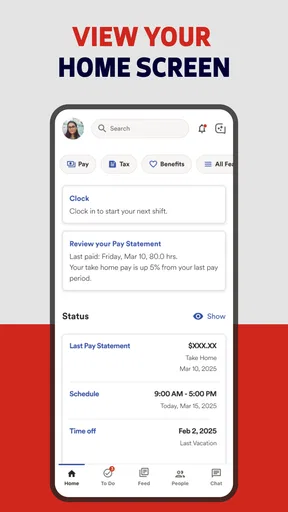
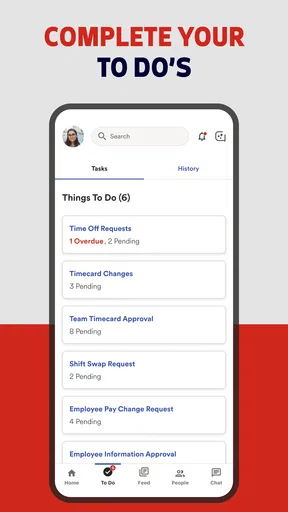
The dashboard is where the magic happens. It’s clean, straightforward, and everything you need is just a tap away. Whether you’re checking your pay, dealing with time-off requests, or managing your benefits, it’s all right there. Trust me, you’ll feel like you’ve got a personal assistant in your pocket.
Make the app part of a useful capture habit
A practical way to use an employee portal is to check it at the moment a question arises, then take any action that belongs to you while the detail is fresh. If you are reviewing a pay statement, for example, compare the figures with your own hours or notes rather than assuming a quick glance is enough. If something looks unfamiliar, make a note of the specific item and ask payroll or HR; the app can help you locate the record, but it does not replace a conversation about an exception.
This kind of small workflow is more dependable than treating the app as a place to browse whenever you have spare time. I would check a relevant item after a pay period, review a leave request when planning time away, and look at benefits when there is an actual decision to make. That keeps the app tied to a real need instead of turning it into another notification-shaped distraction. It is also a useful way to avoid relying on memory for details that are easier to verify in the appropriate work record.
One trade-off is that employee information can be spread across separate sections and employer processes. A mobile dashboard may make entry points easy to find, but it does not mean every task follows the same steps or is available to every employee. I would avoid assuming that one person’s screen or workflow will match another’s, especially when workplace roles, policies, or ADP configurations differ. Before relying on a particular function for a deadline, open it once and learn where the relevant details appear.
Features that Make Life Simpler
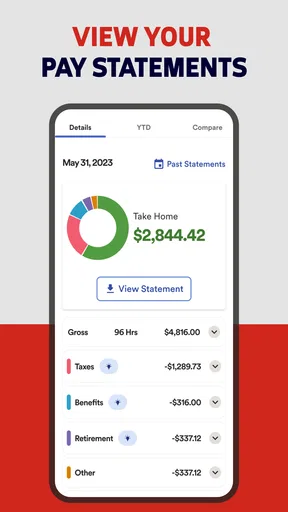
Let’s talk features. One of my favorites is the pay schedule. You can see all your past pay stubs and even calculate your take-home pay for the next cycle. No more guessing or complicated spreadsheets!
Then there’s the time management feature. Clocking in and out has never been easier. You can do it straight from your phone, which means no more running to the office clock. Plus, you can track your hours and see how much overtime you’ve racked up. Handy, right?
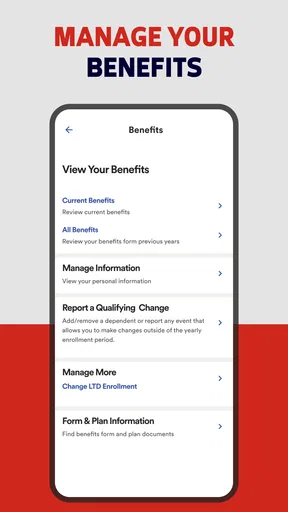
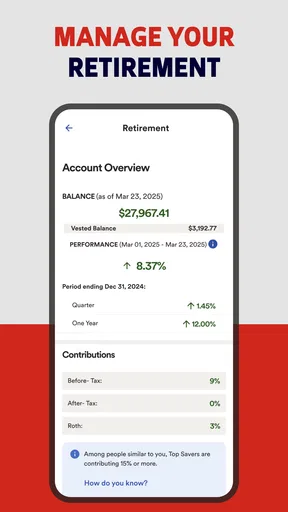
And let’s not forget about the benefits section. Need to check your health insurance details or change your 401k contributions? It’s all there. ADP Mobile Solutions really cuts down on those HR office visits.
A repeatable routine beats occasional browsing
For a realistic everyday example, imagine checking your pay information during a lunch break after noticing that your budget feels tighter than expected. I would open the relevant statement, compare it with the hours I recorded, and flag any difference for the right person instead of trying to diagnose it from a phone screen. If the numbers line up, I can move on without carrying the question around until I get home. The benefit is not that the app answers every payroll question; it is that it gives me a convenient starting point for checking one.
For timekeeping, a consistent habit matters more than checking totals only when a pay date is near. If your employer makes mobile clocking available, I would build it into the start and end of the shift and make a quick review of recorded hours part of the same routine. That can help catch a missed entry while the shift is still easy to remember. It is not a reason to stop keeping any workplace-required records, and employees should follow their employer’s process when correcting a time entry.
Benefits are a different kind of task: usually less frequent, but more consequential. I would use the app to review the information relevant to a decision, then slow down before changing an election or contribution. A quick mobile session is handy for finding a detail, but a benefits choice can have longer-term effects; if wording is unclear, asking the benefits team is wiser than guessing. In other words, convenience should shorten the search, not the thought you give to an important decision.
Where it can fall short
The first possible sticking point is access. Since this is an employee self-service product, having the app installed does not by itself guarantee that every work feature will appear for every user. The employer’s use of ADP and the services connected to an account shape what an employee can do. I would set expectations accordingly: it is a companion to an employer’s system, not a universal HR account that independently supplies every workplace service.
There is also a difference between a quick mobile task and a detailed administrative job. A phone is excellent for checking a record or making a straightforward update, but longer forms and careful comparisons are often easier on a larger screen. If I were dealing with a complicated benefits choice, a correction requiring supporting details, or a question that involves several pay periods, I would gather the relevant information in the app and finish the investigation through the appropriate workplace channel rather than force the whole process onto a small display.
Mobile access also makes practical preparation worthwhile. I would make sure I can sign in before an urgent moment, keep my login details private, and avoid opening personal employment information where someone nearby can read the screen. I would not treat an app as a substitute for basic account care just because it is designed for work. A short, calm first visit is better than discovering a login problem when you need a record quickly.
How it compares with other ways to handle work admin
The usual alternatives are a desktop employee portal, email or paper forms, and a direct message or call to HR. Compared with desktop access, a mobile app is more convenient for quick checks away from work, while a computer is generally more comfortable when you need to read several records closely or complete a longer task. Compared with email and paper, a centralized employee app can make it easier to return to relevant information, but it does not remove the need to communicate when something is unclear or requires approval.
Compared with simply asking HR, the app is most useful for information you can retrieve yourself and tasks your employer has made available to you. That can spare both sides a routine question, but it should not discourage asking for help with a discrepancy, a policy interpretation, or an unusual case. I see the strongest setup as a combination: use the app to find the facts and handle ordinary self-service, then use a person for judgement and exceptions.
ADP Mobile Solutions is free, rated for everyone, and has been available since April 1, 2013. It has a 4.5 average from around 749,000 ratings and more than 10 million installs, which suggests broad use, though popularity alone does not tell me whether a particular employer has enabled the parts I need. The current version is 25.50.0, and it requires Android 10 or later. Those details make it straightforward to judge basic compatibility, but the employer’s setup remains the more important factor in deciding whether it will fit your day.
Security You Can Trust
Now, I know what you’re thinking—what about security? Rest easy, because ADP’s got you covered. The app uses advanced encryption and other security measures to keep your data safe. It’s like having a digital vault for all your work-related info.
"ADP Mobile Solutions makes managing work life a whole lot easier, freeing up time for the things you love."
Who will get the most from it
I would recommend it to employees whose workplace already runs relevant services through ADP and who want a practical mobile way to check employment information between visits to a computer. It may be especially useful if you work away from a desk, need to keep an eye on recorded hours, or prefer to review pay details privately when you have a moment. Its appeal is less about replacing an entire work system and more about putting employee self-service within reach when a small question comes up.
I would skip it as a primary solution if your employer does not use ADP for the services you need, or if you expect it to settle complicated payroll and benefits questions without help from a person. I would also choose a desktop portal for a task that involves a lot of reading, comparisons, or careful form entry. The app makes the most sense when the job is a quick check or a straightforward action, not when the underlying issue needs explanation.
For anyone deciding whether it is worth trying, the simplest test is to ask whether your employer has directed staff to use ADP and what kinds of employee services are available through your account. Then sign in when you have time, find the sections you expect to use, and learn the route before a deadline. That small bit of preparation turns a new app from an uncertain extra into a tool you can reach for with a clear purpose.
Final Thoughts
All in all, if you’re looking for a way to streamline your work life, ADP Mobile Solutions is the app you didn’t know you needed. It’s user-friendly, packed with features, and secure. Whether you’re a payroll pro or a newbie, this app makes managing your work life easier, freeing up time for the things you love.
So, why not give it a whirl? Download ADP Mobile Solutions today and say goodbye to your work-life hassles!
Privacy and Permissions
See what permissions an app requests and how it handles your data.
- Identity
- find accounts on the device
- Contacts
- find accounts on the device, read your contacts, modify your contacts
- Location
- approximate location (network-based), precise location (GPS and network-based), access extra location provider commands
- Photos/Media/Files
- read the contents of your USB storage
- Storage
- read the contents of your USB storage
- Camera
- take pictures and videos
- Microphone
- record audio
- Wi-Fi connection information
- view Wi-Fi connections
- Other
- view network connections, pair with Bluetooth devices, access Bluetooth settings, change network connectivity, full network access, change your audio settings, control Near Field Communication, read sync settings, run at startup, reorder running apps, control vibration, prevent device from sleeping, toggle sync on and off
Verdict
Strengths of ADP Mobile Solutions
- User-friendly interface for quick access.
- Real-time updates on payroll and benefits.
- Secure login with fingerprint authentication.
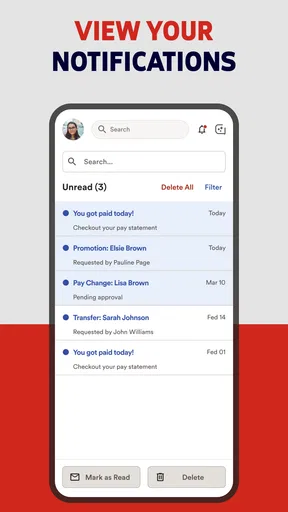
- Customizable notifications for important alerts.
- Integration with multiple ADP services.
Limitations of ADP Mobile Solutions
- Limited features compared to desktop version.
- Occasional login issues reported by users.
- App can be slow during peak hours.
- Infrequent updates may delay bug fixes.
- Some features require additional subscriptions.
Other Releases by ADP, INC.
View All
myWisely: Mobile Banking
Finance4.3

My Work
Business4.2
Similar Picks in This Category
View All
LinkedIn: Community & Network
LinkedIn3.8

Zoom Workplace
zoom.com4.1

Microsoft Teams
Microsoft Corporation4.6

Meta Business Suite
Meta Platforms, Inc.4.6

Webex Meetings
Cisco Systems, Inc.4.5

TeamViewer Remote Control
TeamViewer4.4
Frequently Asked Questions
What is ADP Mobile Solutions used for?
ADP Mobile Solutions is designed to provide employees with convenient access to their payroll, benefits, and other HR information. Users can view pay statements, manage time-off requests, access tax documents, and track hours worked, all from their mobile devices. This app streamlines HR management, making it easier for employees to stay informed and engaged.
Is ADP Mobile Solutions secure?
Yes, ADP Mobile Solutions prioritizes user security by implementing multiple layers of protection. The app uses encryption and secure login methods to protect sensitive information. Additionally, users can enable biometric authentication, such as fingerprint or facial recognition, to ensure that only authorized individuals can access their personal data.
Which devices support ADP Mobile Solutions?
ADP Mobile Solutions is available for both Android and iOS devices. It supports a wide range of smartphones and tablets, ensuring compatibility with most modern devices. To ensure optimal performance, it is recommended to keep your device updated with the latest operating system version and app updates.
Can I access all my HR information through the app?
While ADP Mobile Solutions offers extensive features for accessing HR information, availability may vary depending on your company's specific setup with ADP. Commonly available features include viewing pay statements, managing time-off requests, and accessing benefits information. It's best to check with your HR department for details on which features are enabled for your account.
How can I troubleshoot issues with ADP Mobile Solutions?
If you encounter issues with ADP Mobile Solutions, start by checking your internet connection and ensuring the app is updated to the latest version. Restarting your device can also resolve many problems. If issues persist, contact your company's HR department or ADP Support for further assistance. They can provide specific guidance tailored to your account and setup.
